

Koop is the best MCP server for doing SOC 2 work in Claude if your team has fewer than 50 people and is preparing for its first audit. Claude can do most of the SOC 2 loop through it: filing evidence on tests, marking readiness, taking policies through approval, scoring risks, reviewing vendors and answering auditor requests. Koop ships 19 skills that teach Claude each job, shows you a preview of every change before making it, and includes the MCP in every plan from $299 a month. Vanta, Drata and Sprinto also run hosted MCP servers that read and write. Each suits teams already on that platform.
Key takeaways
- The best MCP for SOC 2 in Claude is Koop, for teams under 50 people preparing a first audit. Its 45 tools cover 130 reads and actions across evidence, tests, policies, risks, vendors and audits. Its 19 built-in skills tell Claude how to do each job, every change waits for your OK, and it costs nothing extra on plans from $299 a month.
- Vanta lists 176 tools in Claude's connector directory, but its developer docs say it has no read-only mode.
- Drata gives admins the most control over what Claude may change, through 29 OAuth scopes. But its 36 tools can't draft policies or change test status.
- Sprinto lists 395 tools and documents the most AI clients. None of the three competitors documents a server-side preview before a change.
SOC 2 MCP servers in a nutshell
Sources: each vendor's docs and Claude's connector directory, all checked November 4, 2026. Tool counts are what each vendor publishes; see How we compared.
How we compared
We wrote this for a team of fewer than 50 people preparing for a first SOC 2 audit (Type I or Type II) that wants Claude, on claude.ai, Claude Desktop or Claude Code, to do the work rather than only report on it. We scored six criteria:
Sources. Vendor developer docs, help centers, release notes, pricing pages, Claude's connector directory, Vendr and AWS Marketplace, all checked on November 4, 2026. For Koop we used the live connector in Claude on November 3 and 4, 2026, and counted its tools there.
What we did not test. We had no Vanta, Drata or Sprinto accounts, so we compared those servers from their documentation and directory listings. Tool counts are not like for like: Koop groups several actions under one tool, while Sprinto lists most actions as separate tools. So we compared jobs, not tool totals.
1. Koop: best for doing SOC 2 work in Claude
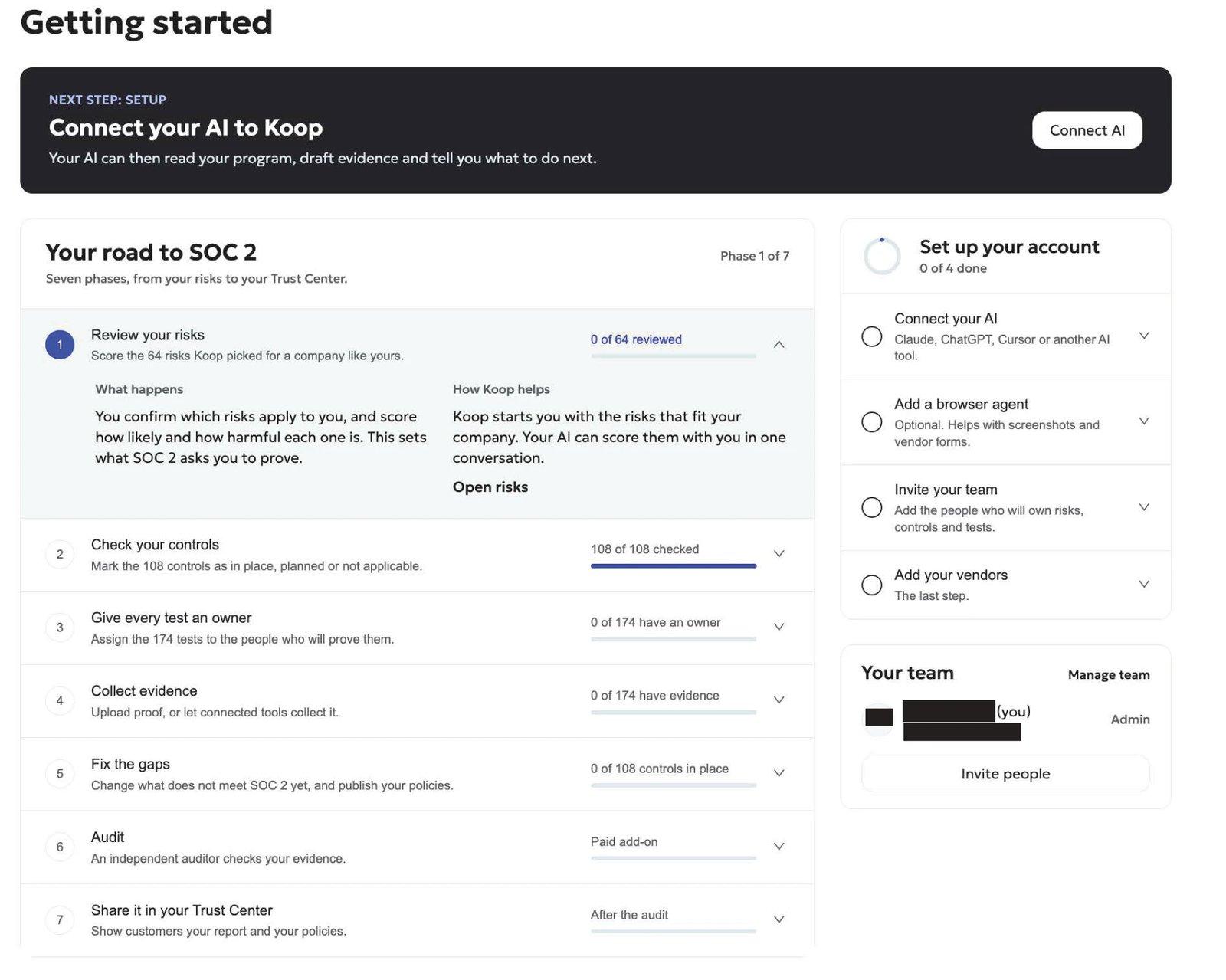
Koop is a compliance and insurance platform for SOC 2, ISO 27001, ISO 42001, HIPAA, CMMC and NIST SP 800-171. Koop MCP connects Claude to your Koop account. Claude signs in as you, sees only what your role can see in the portal, and works through 45 tools: 17 that only read and 28 that make changes. Koop's tool catalog breaks those into 130 distinct reads and actions. Connecting your AI is the first setup step on Koop's Getting started page (Figure 1).
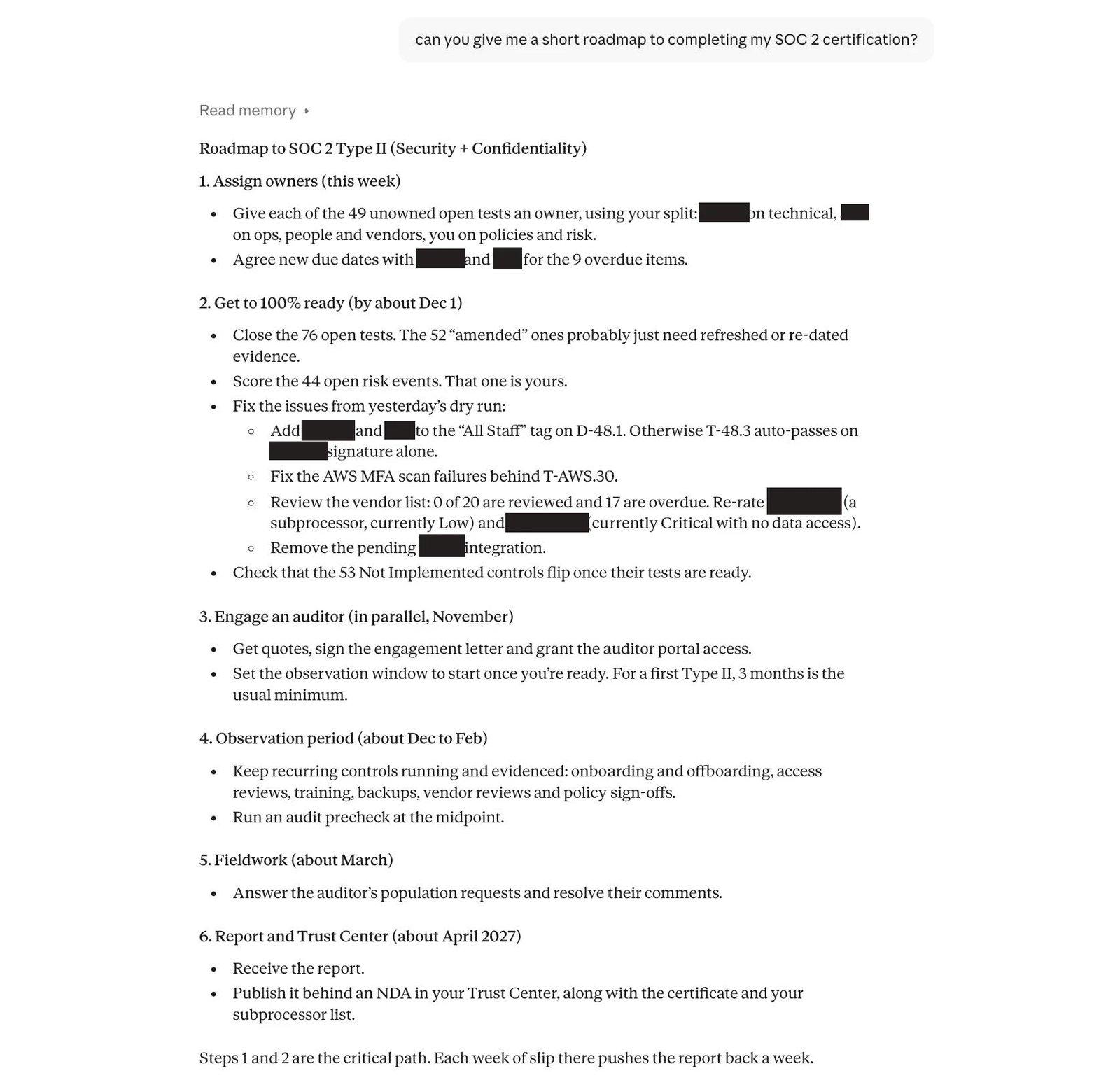
What Claude can do for your SOC 2 through Koop
- Status and owners. Progress per framework, open gaps grouped by reason (not ready, waiting for evidence, flagged by the auditor, overdue) and each person's workload.
- Evidence. Claude files written evidence as a PDF, or uploads files through a single-use link, on up to 10 tests in one filing. It lists every gap and asks whether to share the gaps with the auditor before anything is filed.
- Readiness. Claude marks a test ready, not ready or not applicable (with the reason the auditor reads), but only when you ask.
- Policies. Claude drafts from what is actually configured, sets approvers and sends the draft for review. Approval and publishing are separate steps.
- Risk assessment. Claude suggests inherent and residual likelihood and impact (1 to 5) and a treatment for each risk event, then saves up to 25 at a time once you agree.
- Description of System. Claude drafts your SOC 2 Description of System from your code and infrastructure, citing a source for every statement, and saves it as a draft for a person to review.
- Auditors, vendors and people. Claude answers population requests with samples, keeps vendor, asset and employee inventories current, and (for admins) prepares and publishes your Trust Center.

19 skills come with the connector
Skills are step-by-step guides the Koop connector hands Claude: how to collect evidence, run a gap assessment, draft a policy, score risks, chase the team or answer the auditor. They load from the server, so they work in claude.ai, Claude Desktop, Claude Code and ChatGPT with nothing to install.
For SOC 2, the evidence-collection skill includes one instruction file for each of 174 SOC 2 tests. Each file gives the evidence type, the time window, whether a capture needs a visible timestamp and which tests can share a sample. That is the difference between Claude guessing what an auditor wants and Claude checking it.
Every change waits for your OK
Each of Koop's 28 change tools returns a preview first and changes nothing. Koop applies the change only when Claude sends back that preview's single-use confirmation token, and only if nothing has changed since. Koop logs each preview and each confirmed change with your user and the time. Files move through single-use links, so their contents stay out of the chat, and Koop marks text from your files as data that Claude must never follow as instructions.
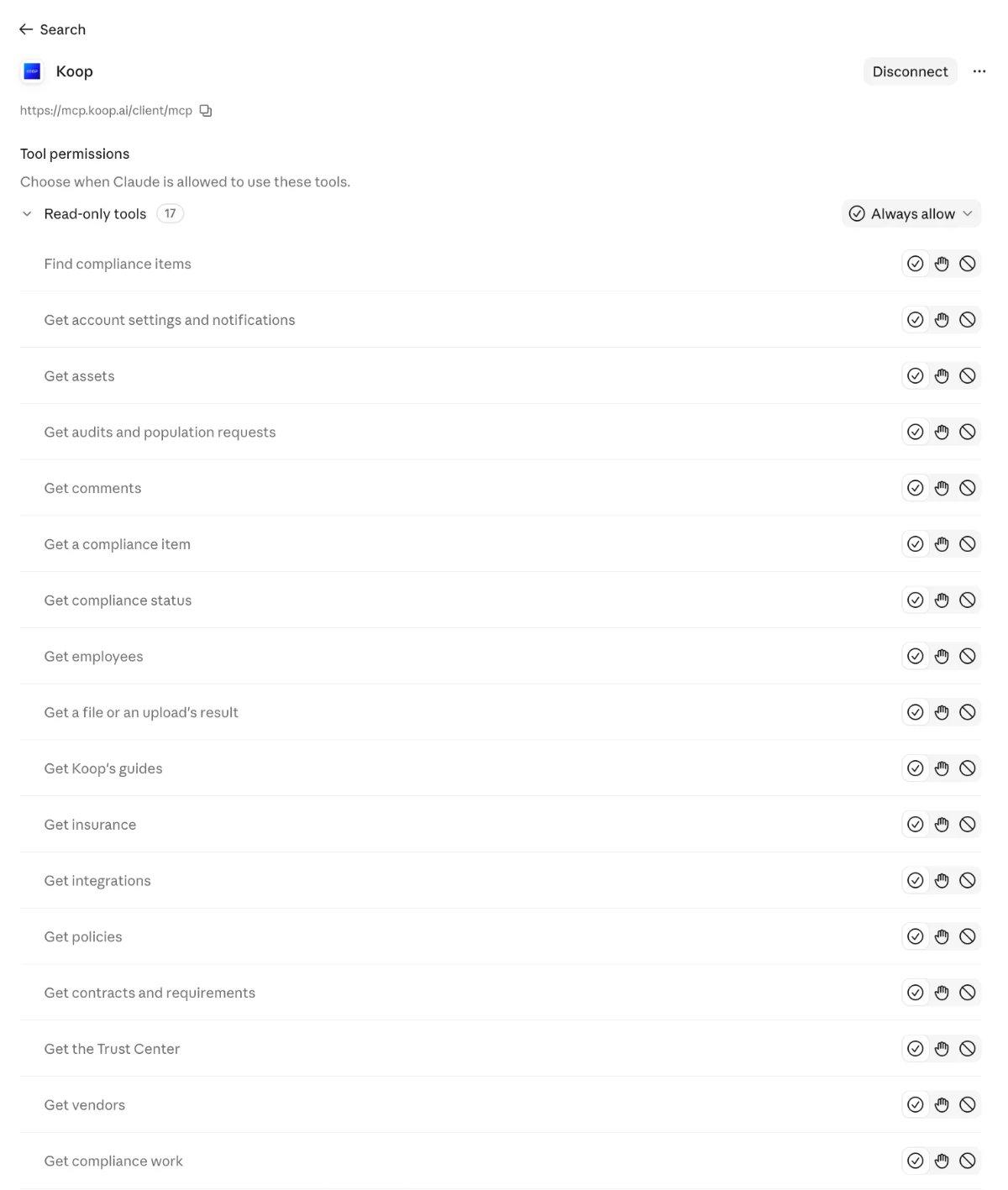
Claude's own connector settings add a second layer. Because Koop marks its 17 read tools as read-only, Claude groups them, so you can let reads run and keep an approval prompt on every change.
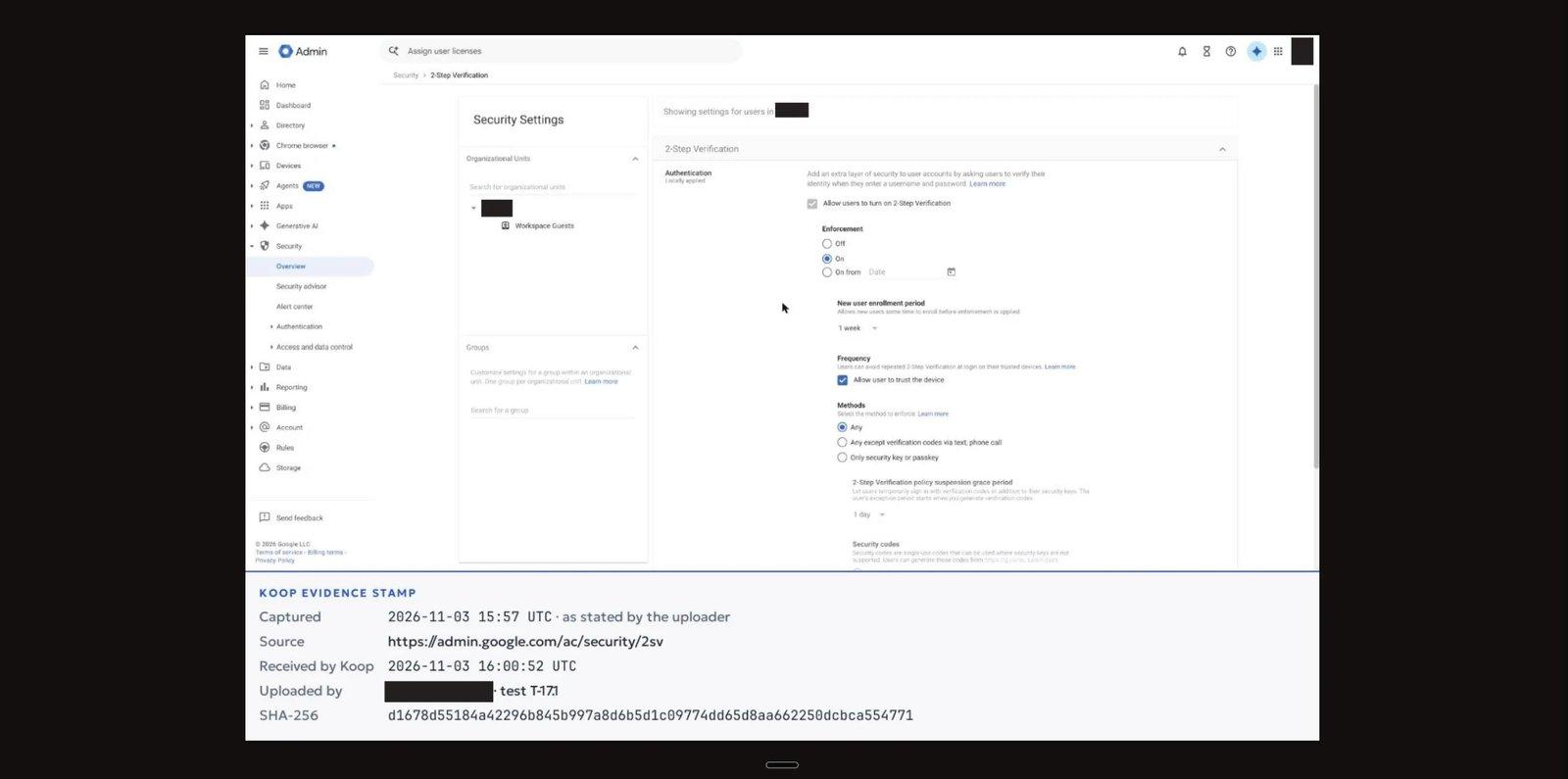
Screenshots an auditor can date
Configuration tests need dated proof. When Claude captures a settings page in your browser (with Claude in Chrome) and uploads it, Koop adds a footer to the image. The footer gives the capture time as stated, the source URL, the time Koop received the file, the uploader and the test, and the file's SHA-256 hash. Claude then reports where it filed the file and the status of Koop's AI evidence check.

Where Koop falls short
- Fewer tools. Vanta and Sprinto list more. Some jobs stay in the portal: signing a policy, marking an item audited, connecting an integration and editing a user's role.
- Turned on per account. Koop enables AI assistants account by account. If the sign-in page says yours is off, you email support@koop.ai.
- Security questionnaires. Koop handles these in the portal, not through the MCP, while Vanta and Sprinto document questionnaire automation through MCP.
- ChatGPT limits. On ChatGPT, Koop works in Business, Enterprise and Edu workspaces only.
Price. The MCP and skills are included in every plan, per Koop's pricing page, checked November 4, 2026. Starter is $299 a month billed yearly, for teams under 25 people and one certification, with no expert hours. Growth is $999 a month for teams over 25 and two or more certifications, and adds 20 or more expert hours, Claude implementation support, a Trust Center and a mock audit. Enterprise is custom.
Verdict: the strongest choice when you want Claude to do SOC 2 work end to end, with the guardrails to let it.
2. Vanta MCP: widest toolset for Vanta customers
Vanta runs a hosted server in the US, EU and Australia, and Claude signs in with OAuth as the connecting user. Vanta released the remote server to all customers in April 2026. As of November 4, 2026, its developer docs call it beta, and its What's New page calls it a public preview on Essentials plans and above. The Claude directory listing, marked Anthropic verified and added September 2026, shows 176 tools.
What it does well. Per Vanta's product updates, the server gained evidence and document uploads on September 24, 2026, policy generation (beta, admin only) in July, and risk registers in June. Claude can assign test owners, create controls and vendors, submit policies for approval, rerun questionnaires and edit the answer library. Vanta's Claude Code plugin adds two skills, /vanta:fix-test and /vanta:list-tests, which write infrastructure-as-code fixes as pull requests.
Gaps. Vanta's developer docs say there is no read-only mode and no way to give an agent a subset of tools, and that custom tests can't be created or edited through MCP. Its FAQ warns that failed writes can be silent. No tool in its directory listing sets a test to pass or fail; Claude can only deactivate, reactivate or rerun tests. Vanta's two skills run only in Claude Code and ChatGPT, not in claude.ai or Claude Desktop.
- Pros: 176 tools; directory listing
- Cons: no documented preview step; quote-only pricing; plan access described differently on different Vanta pages
Verdict: the pick for existing Vanta customers who want the most actions in Claude and will keep Claude's approval prompts on.
3. Drata MCP: tightest admin scoping
Drata's hosted server has endpoints in the US, EU and APAC. Before anyone connects, a Drata admin creates an MCP OAuth configuration with a name, an expiry date and scopes chosen from 29 (15 read, 14 write). A user can do only what both the scopes and their Drata role allow. Per Drata's developer portal (checked November 4, 2026), the server has 36 tools: 22 read and 14 write. The Claude directory listing was added in August 2026.
What it does well. Scoped, expiring access suits a security team that wants to grant Claude a narrow slice. Claude can create and update controls, manage evidence buckets and files, update personnel, and create, update or delete risks and vendors.
Gaps. Policies and monitoring tests are read-only, and no tool answers questionnaires. Drata covers Trust Center and questionnaire work in a separate SafeBase MCP server, generally available since October 14, 2026. Drata's help center warns that setting an owner replaces existing owners and that users must reconnect to pick up new scopes. Drata's docs don't mention Claude Code. Its own pages also disagree on the tool count (36 in the developer portal, 26 actions on the product page).
- Pros: admin-defined scopes with expiry; directory listing
- Cons: no policy drafting or test readiness through MCP; an admin setup step first; quote-only pricing
Verdict: the pick for Drata customers whose security lead wants Claude limited to named scopes.
4. Sprinto MCP: most tools and AI clients
Sprinto hosts its server in the US, EU, India and Australia, with sign-in through OAuth or a developer API key. An org admin turns it on under Settings, then Sprinto AI, then MCP. Claude's connector directory lists it with 395 tools. Sprinto's docs name the most clients here: Claude on the web, desktop and Code, plus ChatGPT, Cursor, Microsoft Copilot Studio, Gemini CLI and Gemini Enterprise.
What it does well. Per Sprinto's docs (checked November 4, 2026), Claude can create and update policies, send them for approval and approve them; manage evidence requests; import and auto-answer security questionnaires; start offboarding; and create and approve risks, plus work on controls, audits, vendors and incidents.
Gaps. Access follows the user's role, with no read-only switch. An admin can only turn MCP off for the whole organization, which stops every connection at once. The docs describe no confirmation step, don't say whether MCP actions appear in the activity log, and publish no plan requirements or launch date.
- Pros: 395 tools; eight documented clients; questionnaire automation
- Cons: no documented preview step; org-wide off switch only; quote-only pricing
Verdict: the pick for Sprinto customers who work across several AI assistants.
What each MCP lets Claude do for SOC 2
We mapped 13 SOC 2 jobs against each vendor's published tools and docs. "Not found" means the docs and tool list did not show the job on November 4, 2026; it may exist under another name.
Each gap moves work back into a browser tab. On Drata, Claude can write a policy in the chat, but a person still pastes it into Drata and starts the approval there. On Vanta, a team that wants a read-only assistant has to set every write tool to ask in Claude's settings, because the server has no read-only mode.
Verified gaps and how Koop closes them
How each MCP keeps changes under your control
Verdict: Drata gives admins the finest scoping before Claude connects. Koop is the only one of the four that checks each individual change with you, on its own server, before applying it.
What a SOC 2 MCP in Claude costs
None of the three competitors publishes prices, so for them we used the lowest public figure we could cite. These are platform prices only; check what each quote includes for the audit itself.
Method: Koop's monthly list price times 12, and 15% off for prepaying. Vanta: the 12-month Essentials price for 1 to 20 employees on AWS Marketplace. Drata and Sprinto: Vendr's median annual contract across all buyers, not sized to a 20-person team. Checked November 4, 2026.

For a team over 25 people, Koop Growth is $11,988 a year at list price. For larger teams, none of the three competitors publishes a price we could cite by team size.
Other compliance MCP servers we checked
These made our long list but not the top four, mostly because they aren't in Claude's connector directory or Claude can change less through them.
Each vendor's docs, checked November 4, 2026.
How to connect Koop to Claude
- In claude.ai or Claude Desktop, open your connector settings and choose Add custom connector.
- Name it Koop and enter
https://mcp.koop.ai/client/mcp. - Choose Connect, sign in with your normal Koop login, and choose Approve. No API key is needed.
- In the connector's tool permissions, allow the 17 read-only tools and keep approval on for the rest.
- Ask: "Give me a status of my SOC 2."
On a Claude Team or Enterprise plan, only an owner can add a custom connector. They add it once under Organization settings, and everyone else then chooses Connect under Customize, then Connectors. In Claude Code, run claude mcp add --transport http koop https://mcp.koop.ai/client/mcp, then /mcp, choose koop and sign in. Claude's free plan allows one custom connector, per Anthropic's help center.
The same steps sit in the Work in Claude dialog in the Koop portal (Figure 8), with a list of what Claude can and cannot do there. To disconnect, open Settings, then API, then Connected apps in the Koop portal and choose Revoke. Full steps are also on Koop's Claude setup page.

What to test in a trial
Run these five checks on any SOC 2 MCP, with your own account:
- Ask for your SOC 2 status and check the numbers against the portal.
- Ask Claude to file evidence on one test, and look at what it shows you before anything lands.
- Ask for a policy draft from your real setup, and see whether it flags where the policy promises more than you've configured.
- Ask for a change your role can't make in the portal, and confirm the server refuses it.
- Disconnect, then confirm Claude's access stops.
Start free with Koop or book a demo, connect Claude in about two minutes, and run all five on your own SOC 2.
FAQs
What is an MCP server for SOC 2?
An MCP (Model Context Protocol) server connects an AI assistant such as Claude to your compliance platform. Claude can then read your SOC 2 program and, if the server allows it, act on it: file evidence, draft policies, score risks or answer the auditor. It works as you, within your role in the platform.
Does Vanta have an MCP server?
Yes. As of November 4, 2026, Vanta runs a hosted MCP server with 176 tools in Claude's connector directory. Its developer docs call it beta and say it has no read-only mode. It can upload evidence, draft policies (beta, admins only) and assign test owners. Vanta publishes no prices.
Does Drata have an MCP server?
Yes. Drata's hosted MCP server has 36 tools (22 read, 14 write) per its developer portal, checked November 4, 2026. An admin first creates an OAuth configuration with chosen scopes and an expiry date. Policies and monitoring tests are read-only through it, and Trust Center work runs through the separate SafeBase MCP.
Can Claude change my compliance records without asking?
Not through Koop. All four servers act only within your role, and Koop also requires a preview of each change, applying it only when Claude returns that preview's single-use token. Vanta, Drata and Sprinto document no preview step of their own, so keep Claude's approval prompt on for every tool that writes.
Which Claude plans can add a custom MCP connector?
Per Anthropic's help center, checked November 4, 2026, custom connectors work on Claude's Free, Pro, Max, Team and Enterprise plans. Free allows one custom connector. On Team, only owners can add one. Koop connects as a custom connector, while Vanta, Drata and Sprinto also appear in Claude's connector directory.
About this comparison
Koop publishes this article. Facts were checked on November 4, 2026, against the sources below, and prices, plans and tool counts change; we recheck them every 90 days. Vanta, Drata, Sprinto, Secureframe and the other product names are trademarks of their owners, which are not affiliated with this article. Claude is a trademark of Anthropic.
Sources
- Koop, Koop MCP documentation and Plans and pricing, checked Nov 4, 2026; Koop portal screenshots (Figures 1 and 8), Nov 5, 2026
- Koop MCP connector, tool definitions and skills, read in Claude, Nov 3 and 4, 2026
- Anthropic, Claude connector directory: Vanta and Drata listings, and the Sprinto listing, checked Nov 4, 2026
- Anthropic, custom connectors help article, checked Nov 4, 2026
- Vanta developer docs, "Vanta MCP"; Vanta help center, "Connecting to Vanta MCP" and "Vanta MCP troubleshooting and FAQ"; Vanta product updates and What's New, checked Nov 4, 2026
- Drata developer portal, "MCP Server"; Drata help center, "Drata MCP setup and usage guide"; Drata, "SafeBase MCP server is now generally available", checked Nov 4, 2026
- Sprinto docs, "Sprinto MCP", checked Nov 4, 2026
- Secureframe MCP docs; Scrut, Comp AI, Oneleet, Strike Graph and Thoropass MCP pages, checked Nov 4, 2026
- Vendr pricing pages for Vanta, Drata and Sprinto, checked Nov 4, 2026
- AWS Marketplace, Vanta listing, checked Nov 4, 2026